Sitecore OrderCloud is an API-first commerce platform. That is exactly why it works well for manufacturers and distributors building modern ordering experiences. But many of those same organizations still need EDI for high-volume partners, legacy procurement systems, and mandated transaction flows.
The practical answer is not “EDI or APIs.” It is hybrid EDI+API: use EDI where partners require it, but convert EDI into canonical JSON so your OrderCloud implementation stays clean, testable, and observable.
This post outlines a pattern we use with n8n, a custom EDI-to-JSON node, and Layer One’s custom Sitecore OrderCloud node. The result is an automation layer that ingests 850s, emits 855s, handles 997 acknowledgments, enforces validations, and produces publish proof for operational SLAs.
This is not meant to be an example of complete EDI handling, but rather a template for connecting EDI to Sitecore OrderCloud using low-code mechanisms.
Who this is for
- Manufacturers and distributors running Sitecore OrderCloud who need to support X12 (and optionally EDIFACT) transactions
- Teams modernizing integrations without replacing existing VAN/AS2/SFTP connectivity on day one
- Commerce and integration leaders who want fewer exceptions, fewer manual touches, and faster partner onboarding
The problem: why EDI is still required and why API-only fails
If you sell through distributors or large accounts, EDI is still the default contract for ordering. It is embedded in procurement workflows, compliance requirements, and shared operational expectations. Even when a partner has APIs available, their internal systems often still treat EDI as the system boundary for purchasing and invoicing.
An API-only approach fails in two predictable ways. First, it forces each partner into a custom integration path with bespoke payloads and error handling. Second, it pushes “meaning” into application code rather than enforcing it at the integration boundary. That increases exceptions: invalid UOMs, missing ship-to identifiers, pricing mismatches, partial shipments that never reconcile to invoices.
The goal should be simple: treat EDI as a transport format that you translate into canonical JSON contracts. Your OrderCloud implementation then consumes canonical JSON consistently across all partners.
Architecture (hybrid EDI+API)
At a high-level, the n8n workflow below serves as a great abstraction of how this system works.
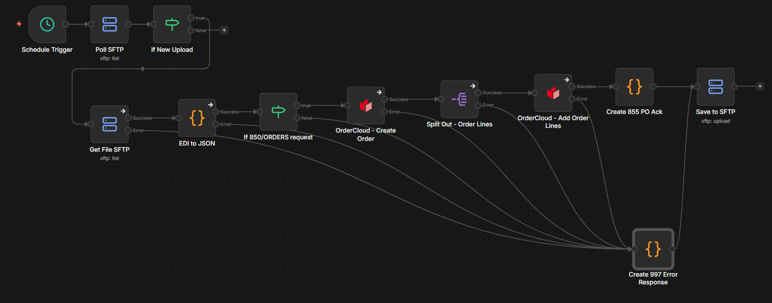
This workflow can be broken down into four main parts:
- Poll for new EDI files
- Convert EDI file into JSON format
- Process order
- Handle success or failure responses
Step 1 - Poll for new EDI files
This section is fairly straight forward and involves creating a scheduled trigger to poll the SFTP server every 1-5 minutes. Onces files are found in the "incoming" folder. For breivity, we'll skip the details here and assume the logic has detected a new EDI file similar to this one:
ISA*00*          *00*          *ZZ*BUYERID        *ZZ*VENDORID       *250217*1000*U*00401*000000001*0*T*>~
GS*PO*BUYERID*VENDORID*20250217*1000*1*X*004010~
ST*850*0001~
BEG*00*SA*PL-10001*20250217~
REF*DP*099~
N1*BY*PLUMBING SUPPLY INC*9*1234567890123~
N1*ST*MAIN WAREHOUSE*9*9876543210987~
N3*123 INDUSTRIAL WAY~
N4*PIPE CITY*OH*44101~
PO1*1*10*EA*25.50**VP*PN-1001*BP*123-A~
PID*F****Copper Pipe 1/2 in~
PO1*2*5*EA*150.00**VP*PN-2002*BP*456-B~
PID*F****PVC Ball Valve 1 in~
PO1*3*20*EA*5.25**VP*PN-3003*BP*789-C~
PID*F****Brass Elbow 90 deg~
PO1*4*10*EA*80.00**VP*PN-4004*BP*101-D~
PID*F****Kitchen Faucet - Stainless~
PO1*5*50*EA*1.50**VP*PN-5005*BP*202-E~
PID*F****Teflon Tape Roll~
PO1*6*15*EA*45.00**VP*PN-6006*BP*303-F~
PID*F****Shower Head - Chrome~
PO1*7*10*EA*12.00**VP*PN-7007*BP*404-G~
PID*F****PVC Pipe Cement~
PO1*8*5*EA*200.00**VP*PN-8008*BP*505-H~
PID*F****Water Heater Element~
PO1*9*100*EA*0.75**VP*PN-9009*BP*606-I~
PID*F****Pipe Hanger Strap~
PO1*10*2*EA*350.00**VP*PN-1010*BP*707-J~
PID*F****Submersible Sump Pump~
CTT*10~
AMT*TT*4350.00~
SE*23*0001~
GE*1*1~
IEA*1*000000001~
Step 2 - Convert EDI file into JSON format
We've covered the basics of this a couple years back in the article How to Convert EDI Documents to JSON in Node.js (X12 or EDIFACT).
For this discussion, the concepts of data segmentation, structural validation and transformation are relevant.
In data segmentaton, the EDI document is broken down into "segments" based on the ~ delimiter. From there, we can validate and transform each segment ultimately producing a JSON structure resembling the following:
{
    "documentType": "X12_850",
    "purchaseOrderNumber": "PL-10001",
    "purchaseOrderDate": "20250217",
    "buyerId": "BUYERID",
    "shipTo": "PLUMBING SUPPLY INC, MAIN WAREHOUSE, 123 INDUSTRIAL WAY, PIPE CITY, OH, 44101",
    "lines": [
          {
            "line": 1,
            "quantity": 10,
            "uom": "EA",
            "unit_price": 25.50,
            "extended_price": 255.00,
            "vendor_part": "PN-1001",
            "buyer_part": "123-A",
            "description": "Copper Pipe 1/2 in"
          },
          {
            "line": 2,
            "quantity": 5,
            "uom": "EA",
            "unit_price": 150.00,
            "extended_price": 750.00,
            "vendor_part": "PN-2002",
            "buyer_part": "456-B",
            "description": "PVC Ball Valve 1 in"
          },
          {
            "line": 3,
            "quantity": 20,
            "uom": "EA",
            "unit_price": 5.25,
            "extended_price": 105.00,
            "vendor_part": "PN-3003",
            "buyer_part": "789-C",
            "description": "Brass Elbow 90 deg"
          },
          {
            "line": 4,
            "quantity": 10,
            "uom": "EA",
            "unit_price": 80.00,
            "extended_price": 800.00,
            "vendor_part": "PN-4004",
            "buyer_part": "101-D",
            "description": "Kitchen Faucet - Stainless"
          },
          {
            "line": 5,
            "quantity": 50,
            "uom": "EA",
            "unit_price": 1.50,
            "extended_price": 75.00,
            "vendor_part": "PN-5005",
            "buyer_part": "202-E",
            "description": "Teflon Tape Roll"
          },
          {
            "line": 6,
            "quantity": 15,
            "uom": "EA",
            "unit_price": 45.00,
            "extended_price": 675.00,
            "vendor_part": "PN-6006",
            "buyer_part": "303-F",
            "description": "Shower Head - Chrome"
          },
          {
            "line": 7,
            "quantity": 10,
            "uom": "EA",
            "unit_price": 12.00,
            "extended_price": 120.00,
            "vendor_part": "PN-7007",
            "buyer_part": "404-G",
            "description": "PVC Pipe Cement"
          },
          {
            "line": 8,
            "quantity": 5,
            "uom": "EA",
            "unit_price": 200.00,
            "extended_price": 1000.00,
            "vendor_part": "PN-8008",
            "buyer_part": "505-H",
            "description": "Water Heater Element"
          },
          {
            "line": 9,
            "quantity": 100,
            "uom": "EA",
            "unit_price": 0.75,
            "extended_price": 75.00,
            "vendor_part": "PN-9009",
            "buyer_part": "606-I",
            "description": "Pipe Hanger Strap"
          },
          {
            "line": 10,
            "quantity": 2,
            "uom": "EA",
            "unit_price": 350.00,
            "extended_price": 700.00,
            "vendor_part": "PN-1010",
            "buyer_part": "707-J",
            "description": "Submersible Sump Pump"
          }
    ],
    "totalLineCount": 10,
    "totalUnits": 227,
    "orderTotal": 4350.00
    "refs": []
}
Step 3 - Process order
In this next section we use the emitted JSON to lookup the relevant Ids, create the incoming order and insert all the order lines. For breivity, we won't dive into the use of the OrderCloud API, but it's important to note that the OrderCloud n8n node primarily relies on the following API Endpoints:
- https://api.ordercloud.io/v1/buyers
- https://api.ordercloud.io/v1/buyers/{buyerID}/addresses
- https://api.ordercloud.io/v1/orders/incoming
- https://api.ordercloud.io/v1/orders/incoming/{orderID}/lineitems
Given the highly flexible nature of Sitecore Ordercloud, your implementation will likely vary.
Step 4 - Handle success or failure responses
As you can see from the right side of the workflow, the last step is either to ackknowledge the order using an 855 document, or a 997 acknowledgement indicating an error. Within the 855 document each line should be acknowledged or rejected based on the response from Ordercloud. An accecpted line response would look like:
PO1*1*10*EA*25.50**VP*PN-1001*BP*123-A~
PID*F****Copper Pipe 1/2 in~
ACK*IA*10*EA*068*20250221~
Noting the IA after the ACK as acceptance.
Similarly, rejection will look like:
PO1*1*10*EA*25.50**VP*PN-1001*BP*123-A~
PID*F****Copper Pipe 1/2 in~
ACK*IR*10*EA***~
Noting the IR after the ACK as rejection.
If there is an overall failure during the handling of the order, it may be appropriate to return a 997 acknowledgement indicating an error.
ISA*00*          *00*          *ZZ*VENDORID       *ZZ*BUYERID        *250217*1015*U*00401*000000002*0*T*>~
GS*FA*VENDORID*BUYERID*20250217*1015*1*X*004010~
ST*997*0001~
AK1*PO*1~
AK2*850*0001~
AK5*R~
AK9*R*1*1*0~
SE*6*0001~
GE*1*1~
IEA*1*000000002~
Noting the R after the AK5 and AK9 as rejection.
Final Thoughts
Stepping back, what this integration really demonstrates is that modern commerce does not require ripping and replacing legacy processes. By orchestrating EDI workflows through n8n and connecting them directly to Sitecore OrderCloud, you create a bridge between structured, decades-old B2B standards and a flexible, API-first commerce platform. Instead of treating EDI as a black box managed by a VAN or an ERP silo, you gain visibility, extensibility, and control. That means faster onboarding of trading partners, easier exception handling, and the ability to layer in automation, validation, and notifications wherever they create the most value.
More importantly, this approach future-proofs your commerce architecture. As customer expectations evolve and new channels emerge, you are no longer constrained by rigid middleware or brittle point-to-point integrations. n8n becomes the orchestration layer, and Sitecore OrderCloud remains the composable commerce engine, allowing you to adapt workflows without destabilizing core systems. The result is not just EDI processing that works, but a scalable, intelligent integration framework that turns operational plumbing into a strategic advantage.